
Example of Create
- Let's create a first endpoint query balance from the database by create
getBalance.jsincontroller->transaction directory
Create a request.
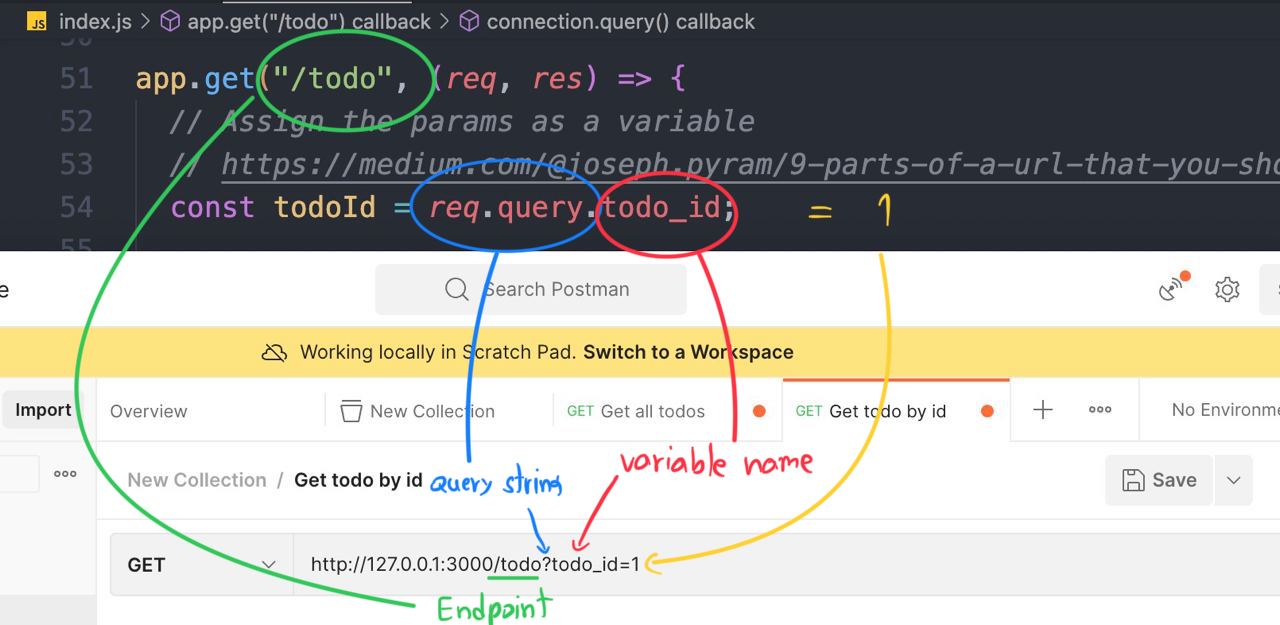
http://127.0.0.1:3000/todo?todo_id=1
Send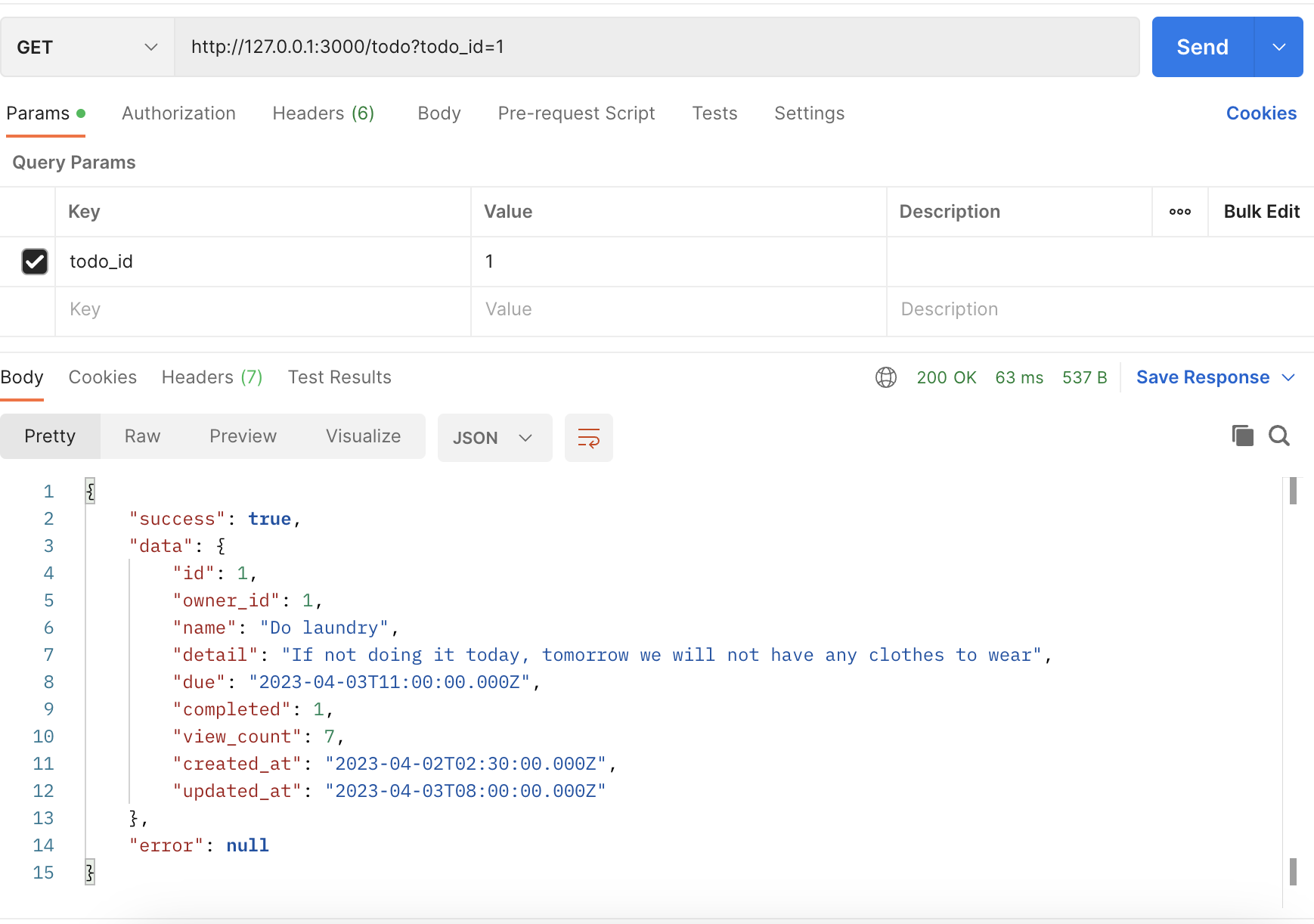
Example of the POST method
- Create an endpoint that create a
user
-
Before writing a request, we need to install the library
body-parserfirst. -
npm i body-parser -
Because Express JS cannot read the JSON body request directly, So we need to install
body-parserfirst.
const bodyParser = require("body-parser"); // import the body-parser
// parse various different custom JSON types as JSON
app.use(bodyParser.json({ type: "application/json" }));
Code ...
const express = require("express");
const app = express();
const mysql = require("mysql2");
const bodyParser = require("body-parser"); 👈🏻
const port = 3000;

const connection = mysql.createConnection({
  host: "server2.mixkoap.com",
  port: "6103",
  user: "root",
  password: "root_apisitmaneerat",
  database: "csc105-workshop",
});

// Connect to database
connection.connect();

console.log("Database is connected");

// parse various different custom JSON types as JSON
app.use(bodyParser.json({ type: "application/json" })); 👈🏻

app.get("/", (req, res) => {
  res.send("Hello World!");
});
.
.
.
.
.
.
- Create an endpoint
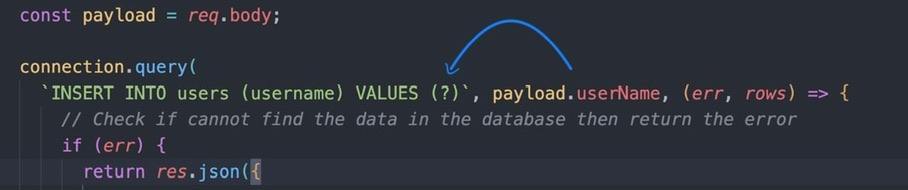
app.post("/todo/create", (req, res) => {
  // The JSON body
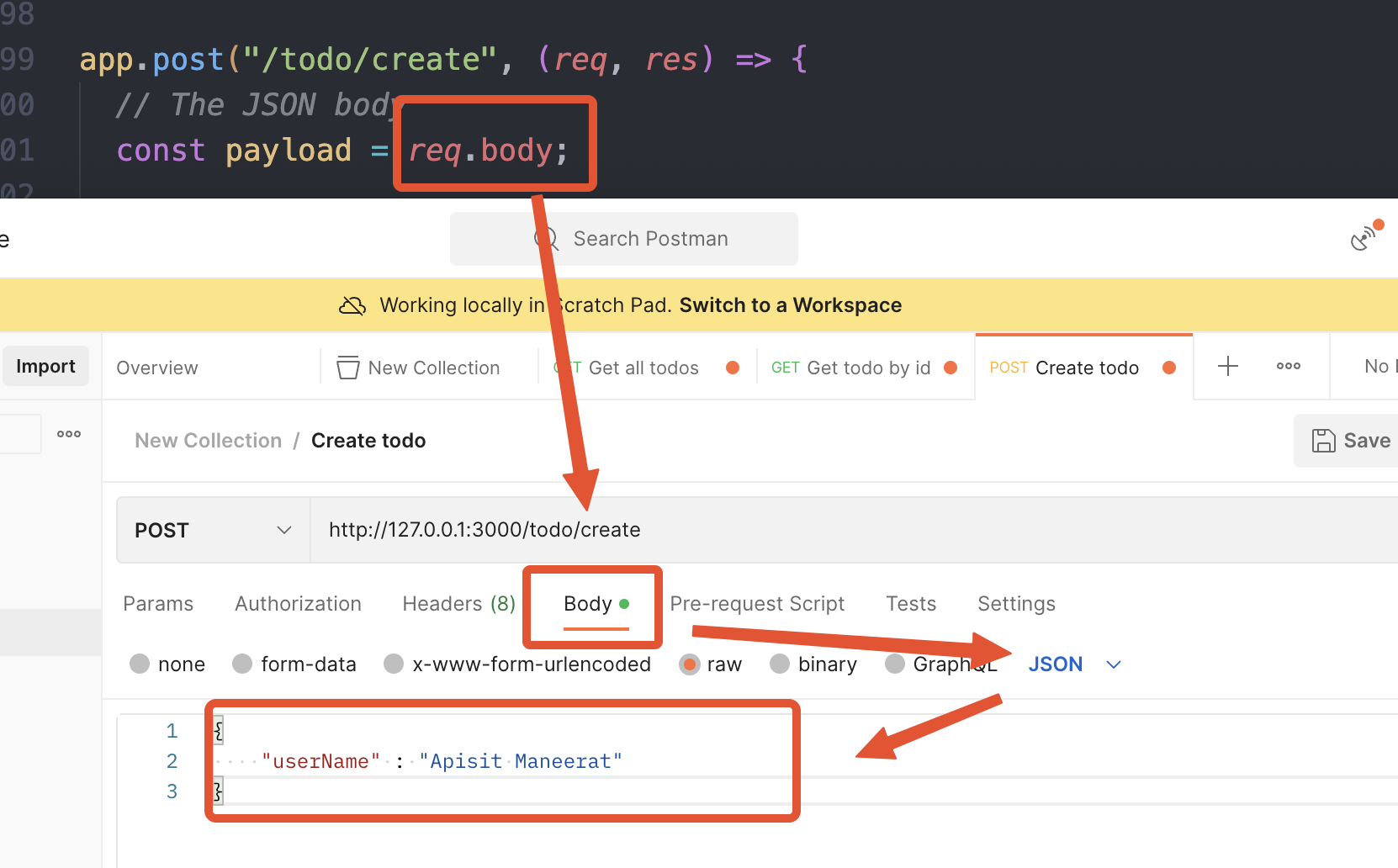
  const payload = req.body;

  connection.query(
    `INSERT INTO users (username) VALUES (?)`, [payload.userName], (err, rows) => {
      // Check if cannot find the data in the database then return the error
      if (err) {
        res.json({
          success: false,
          data: null,
          error: err.message,
        });
      } else {
        // Return data to the client if success
        console.log(rows);
        if (rows) {
          res.json({
            success: true,
            data: {
              message: "create success",
            },
          });
        }
      }
    }
  );
});
- The request body mostly send in
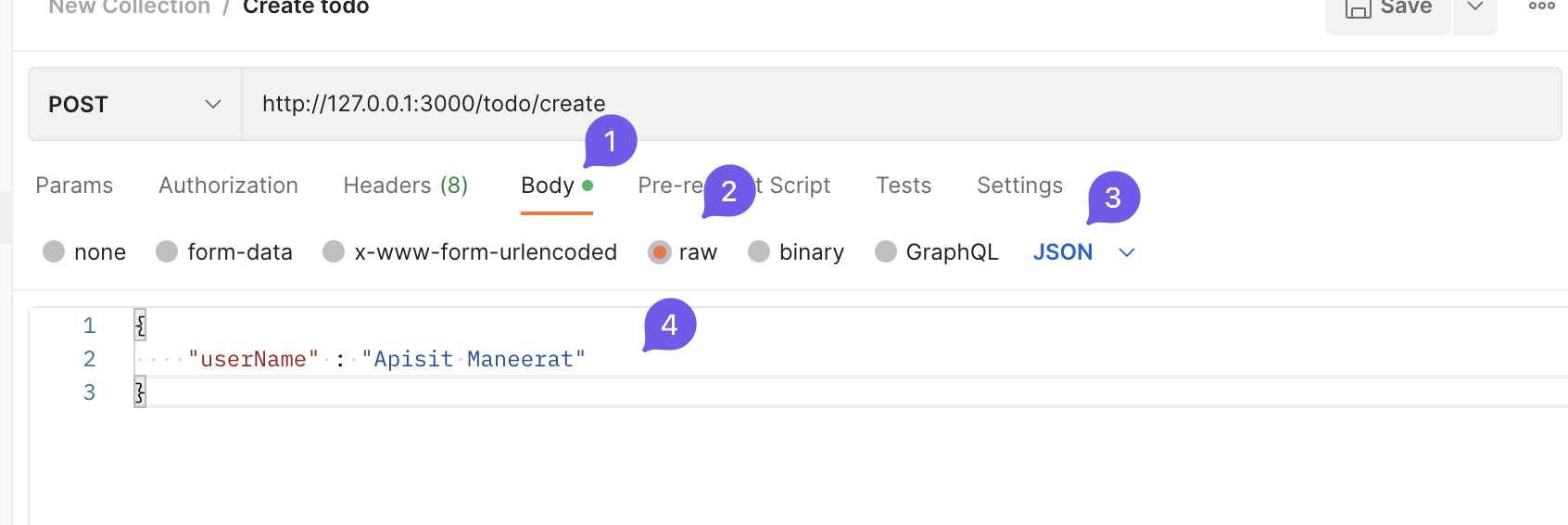
JSONformat 👆🏻 - Create a request in Postman and change the HTTP method to
POST
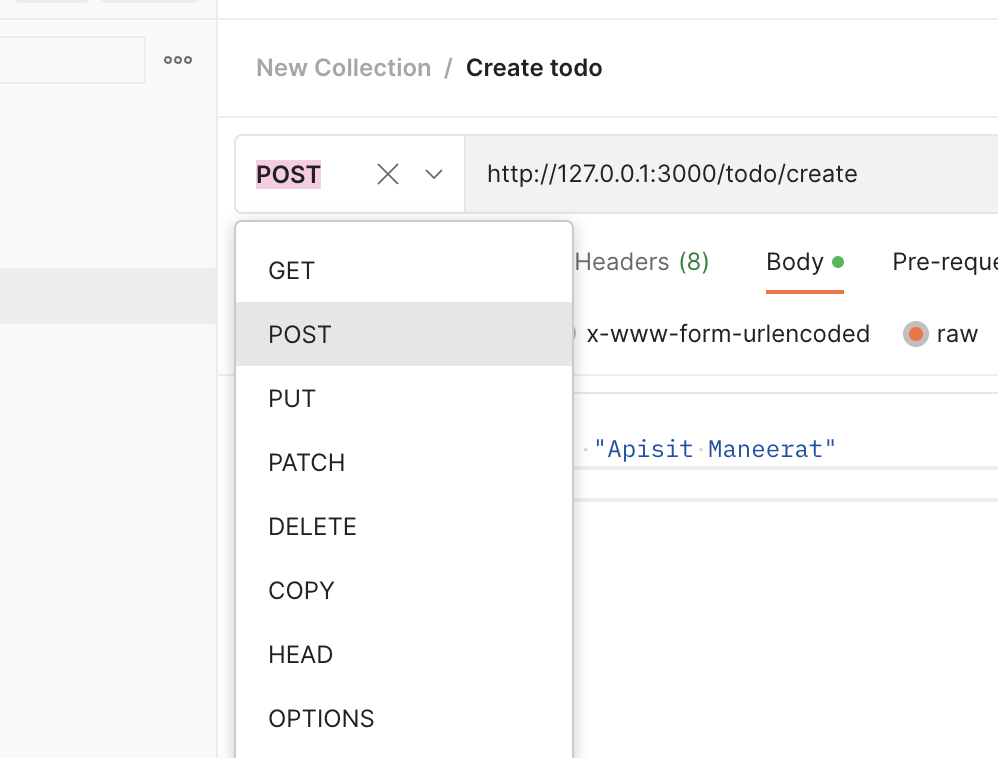
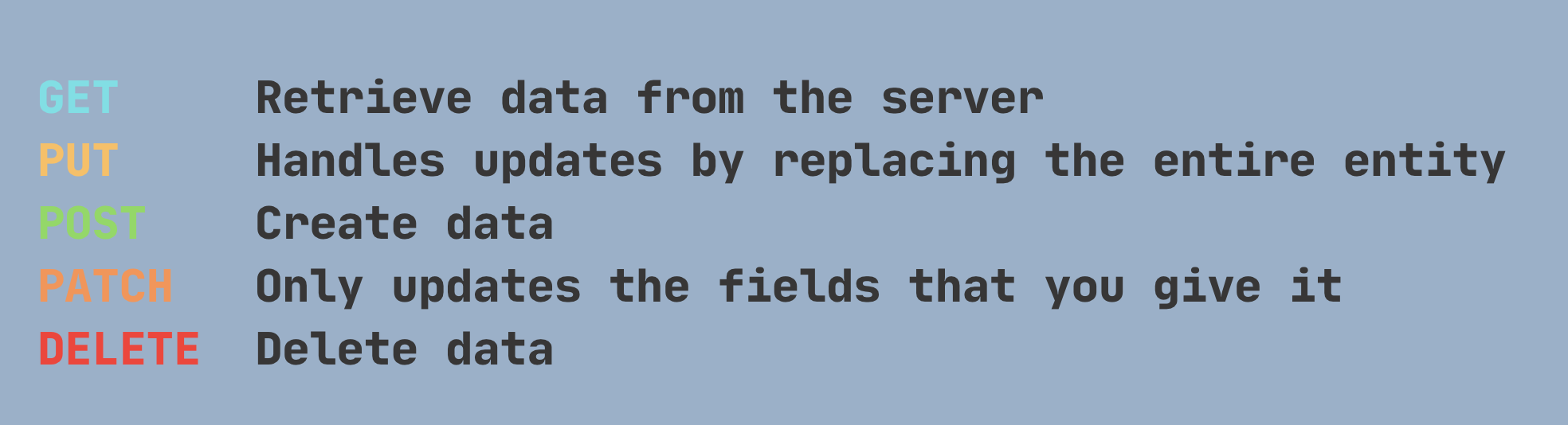
****Remark - HTTP Methods 👇🏻
- Add the
JSONbody 👇🏻
http://127.0.0.1:3000/todo/create
{
    "userName" : "Apisit Maneerat"
}
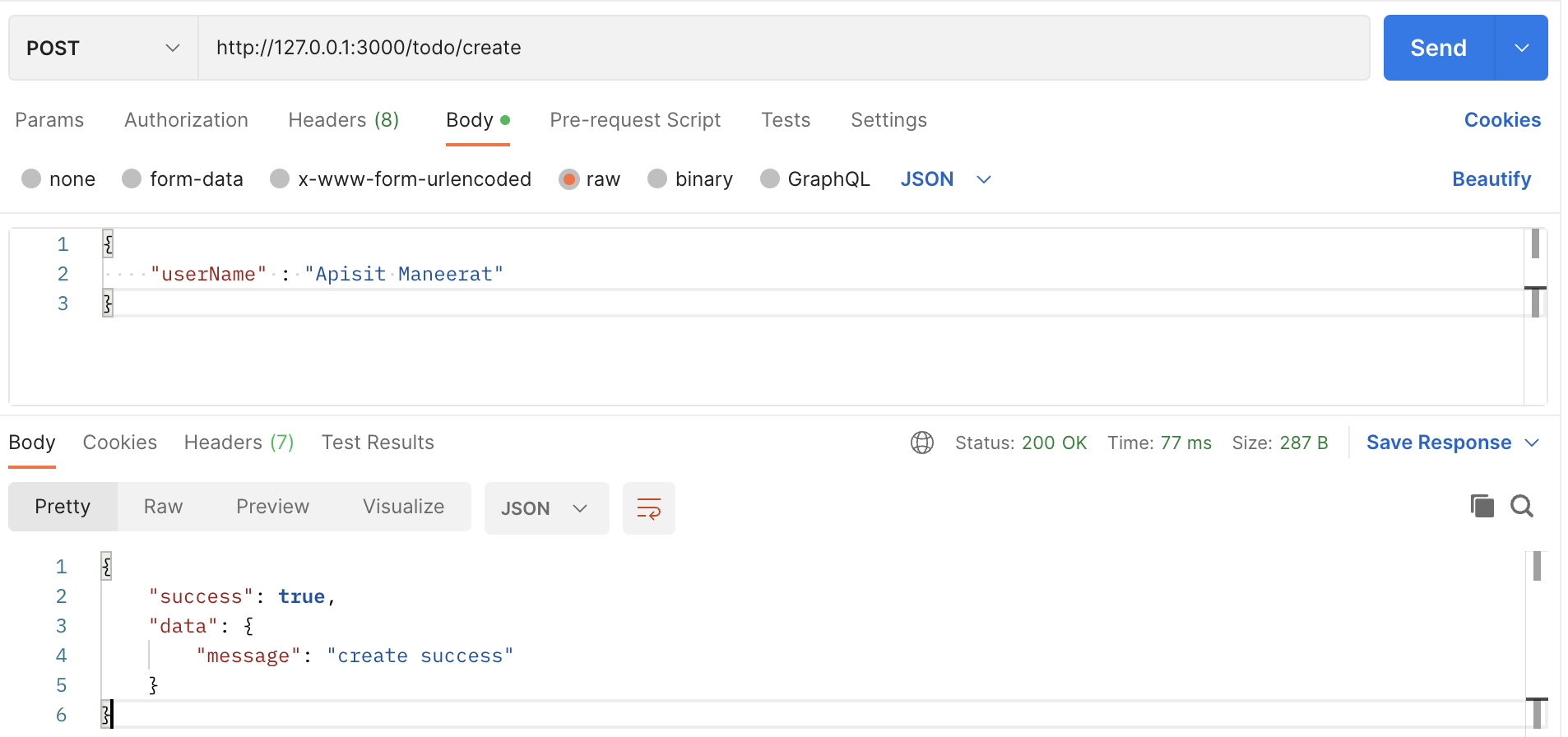
- Click
Send
-
The response from your backend application. 👆🏻
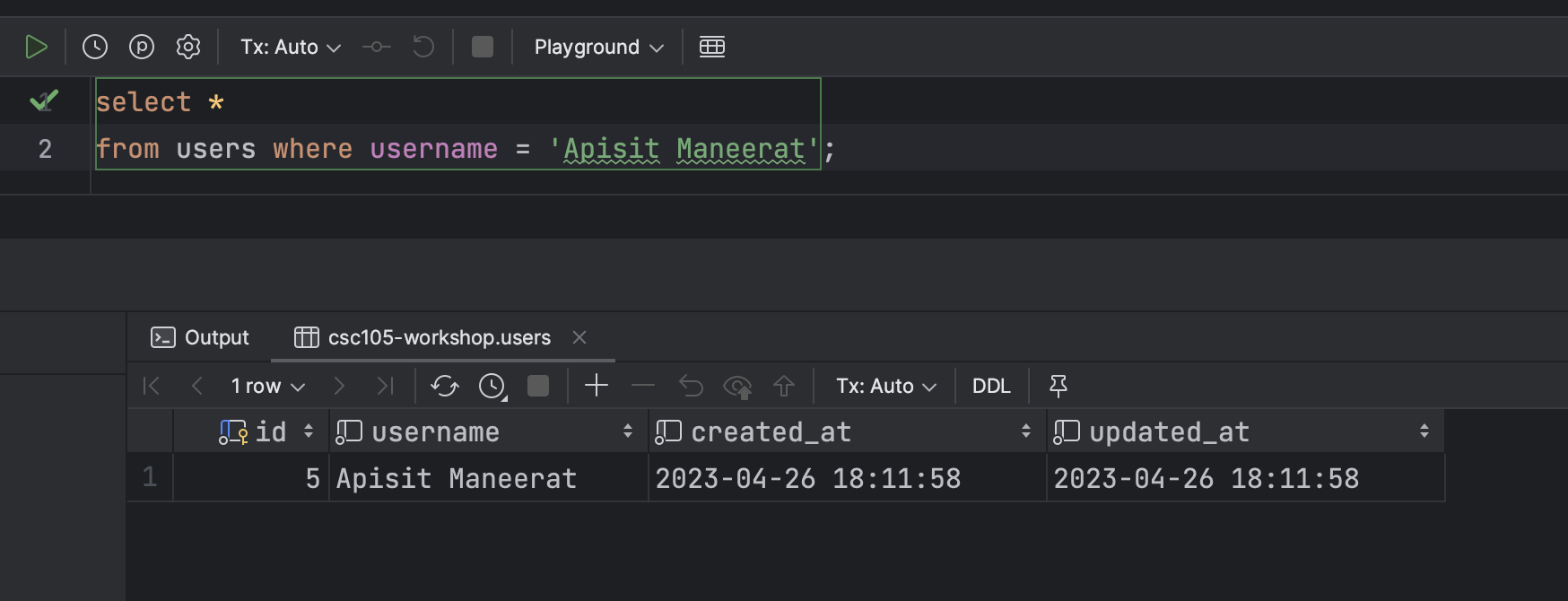
-
In the Database 👇🏻
- For more detail
Example of the PATCH method
- Create an endpoint that edit the data in the Database
- For example we are going to change the
nameanddetailfromid = 1

- Create the endpoint
- For this endpoint we use
.patch()because we are going to edit some fields that you specific in the Database.
app.patch("/todo/edit", (req, res) => {
  // The JSON body
  const payload = req.body;

  console.log(payload);

  connection.query(
    "UPDATE items SET name = ?, detail = ? WHERE id = ?", [payload.name, payload.detail, payload.id],
    (err, rows) => {
      // Check if cannot find the data in the database then return the error
      if (err) {
        res.json({
          success: false,
          data: null,
          error: err.message,
        });
      } else {
        // Return data to the client if success
        if (rows) {
          res.json({
            success: true,
            data: {
              message: "update successfully",
            },
          });
        }
      }
    }
  );
});
- Create a request in Postman
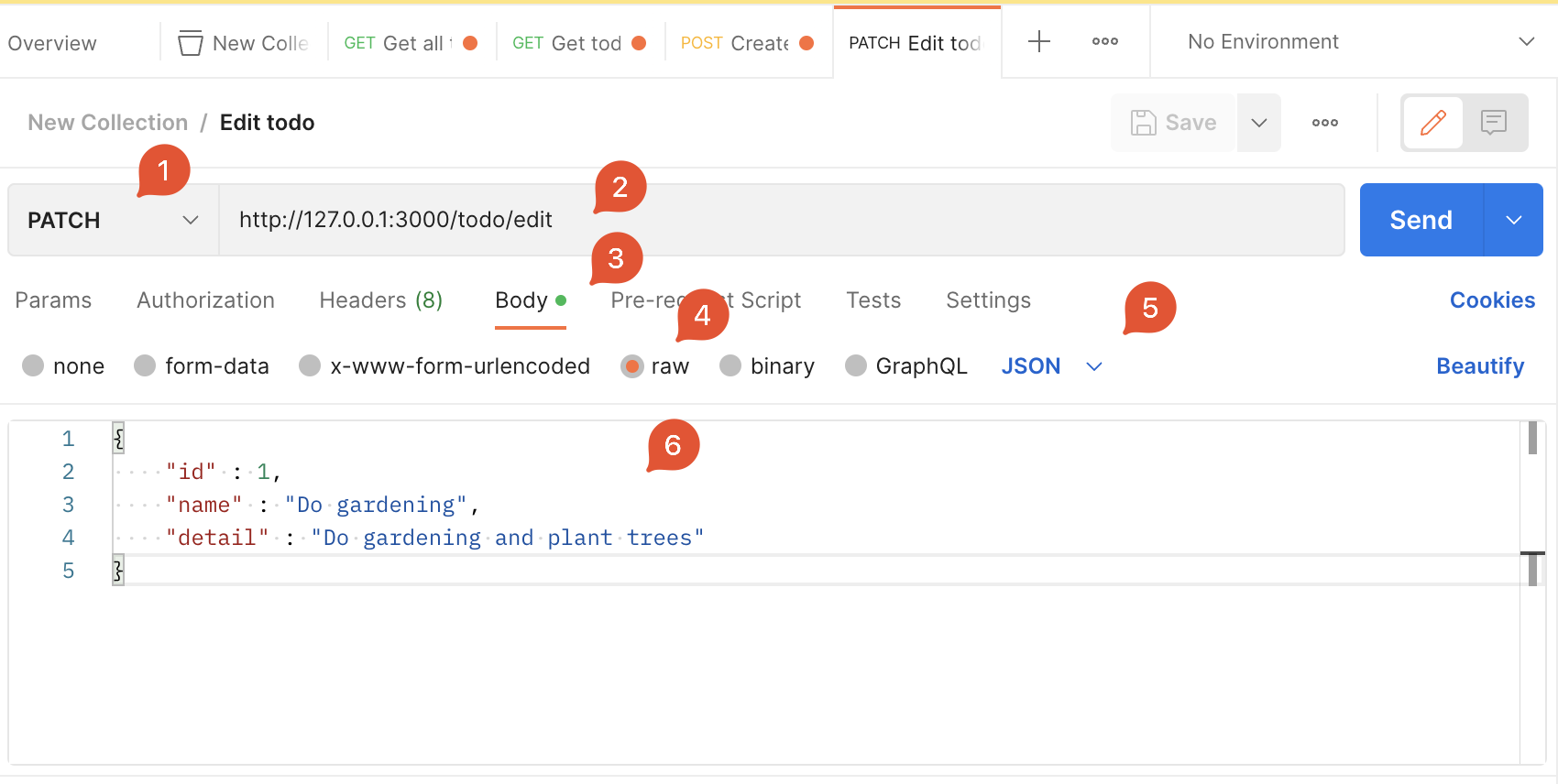
- Click
Send
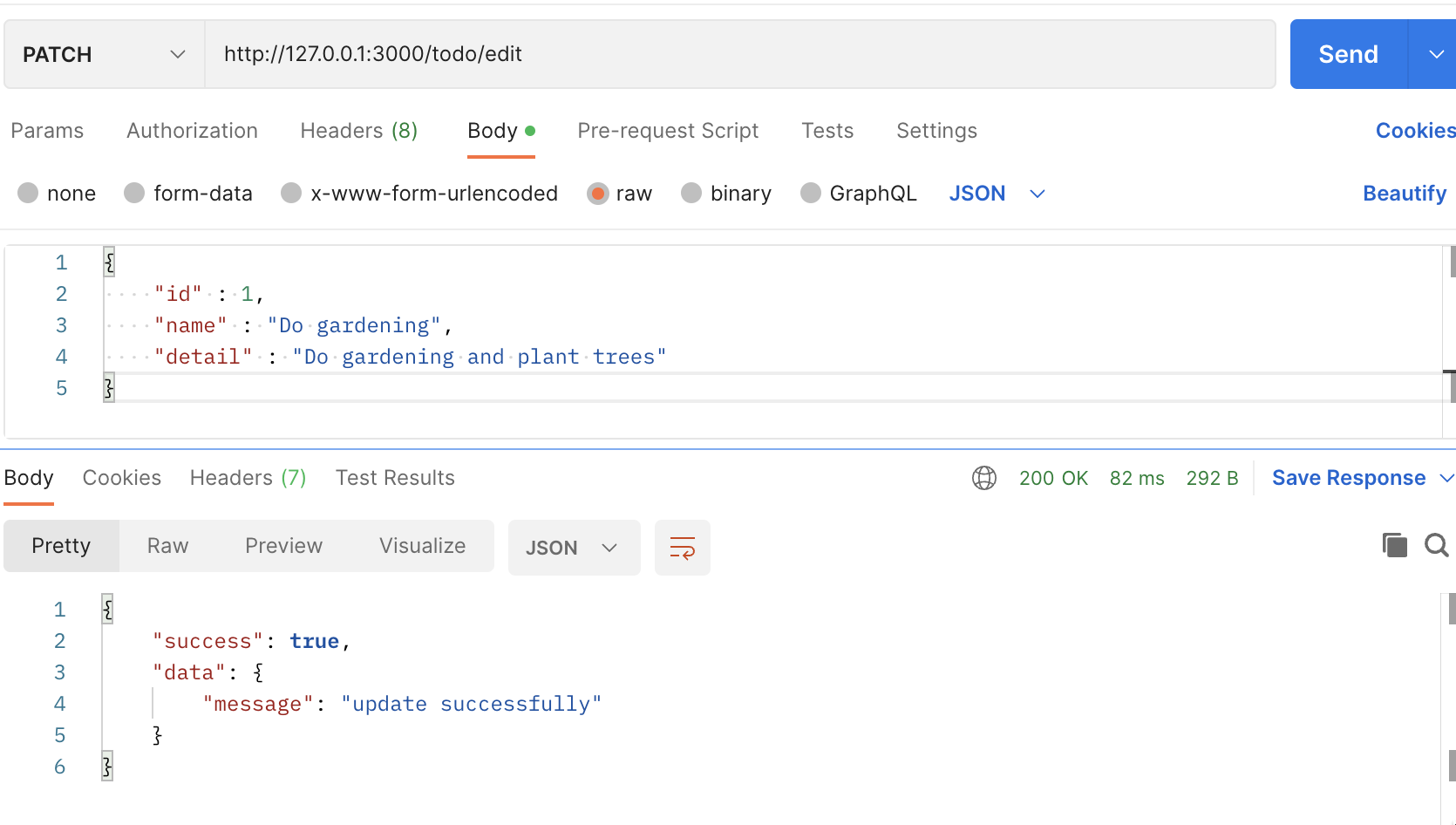
Example of the DELETE method
- Create an endpoint that delete the data from the
linkstable in the database.
- For this endpoint, we will use
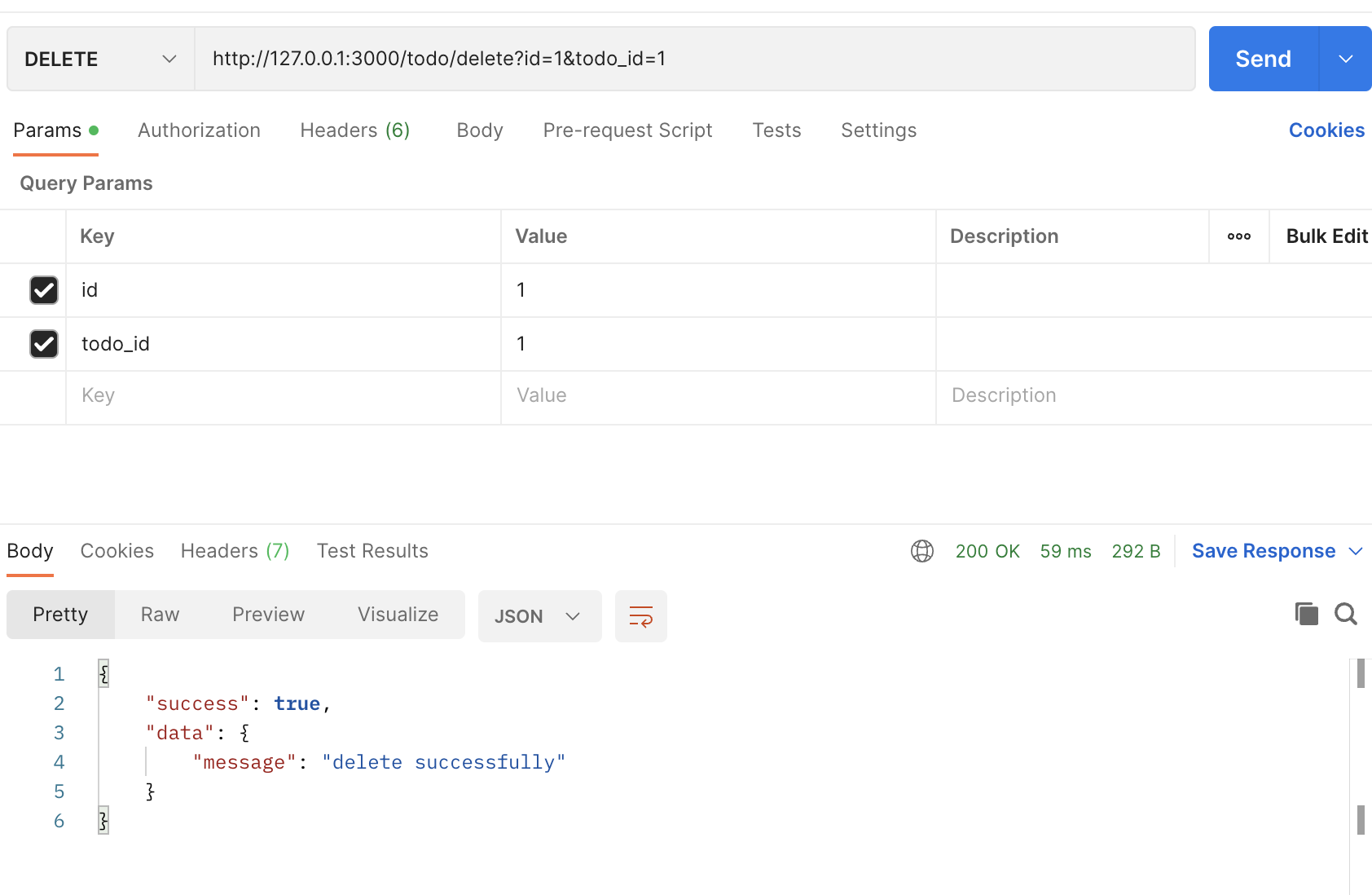
.delete()because we are going to delete data from the database. - We use
query stringto get the data from the client - Create an endpoint 👇🏻
app.delete("/todo/delete", (req, res) => {
  // Assign the params as a variable
  const id = req.query.id;
  const todoId = req.query.todo_id;

  connection.query(
    `DELETE FROM links where id = ? AND todo_id = ?`, [id, todoId],
    (err, rows) => {
      // Check if cannot find the data in the database then return the error
      if (err) {
        res.json({
          success: false,
          data: null,
          error: err.message,
        });
      } else {
        if (rows) {
          res.json({
            success: true,
            data: {
              message: "delete successfully",
            },
          });
        }
      }
    }
  );
});
- Create a request in Postman

- Click
Send
--- End of the example ----
** This is the finalized code for this example 👇🏻
const express = require("express");
const app = express();
const mysql = require("mysql2");
const bodyParser = require("body-parser");
const port = 3000;

const connection = mysql.createConnection({
  host: "server2.mixkoap.com",
  port: "6103",
  user: "root",
  password: "root_apisitmaneerat",
  database: "csc105-workshop",
});

// Connect to database
connection.connect();

console.log("Database is connected");

// parse various different custom JSON types as JSON
app.use(bodyParser.json({ type: "application/json" }));

app.get("/", (req, res) => {
  res.send("Hello World!");
});

app.get("/hello", (req, res) => {
  res.json({
    name: "Apisit Maneerat",
    nickName: "Mixko",
    university: "KMUTT",
  });
});

app.get("/todo/all", (req, res) => {
  connection.query("SELECT * FROM items", (err, rows) => {
    // Check if cannot find the data in the database then return the error
    if (err) {
      res.json({
        success: false,
        data: null,
        error: err.message,
      });
    } else {
      // Return data to the client if success
      res.json({
        success: true,
        data: rows,
        error: null,
      });
    }
  });
});

app.get("/todo", (req, res) => {
  // Assign the params as a variable
  // https://medium.com/@joseph.pyram/9-parts-of-a-url-that-you-should-know-89fea8e11713
  const todoId = req.query.todo_id;

  // Regex to check the todo_is is a number only or not
  const checkTodoId = new RegExp(/^\d+$/).test(todoId); // Boolean

  // Check if the todo_id is not exist or is not a number, return json with an error
  if (!todoId || !checkTodoId) {
    res.json({
      success: false,
      data: null,
      error: "todo_id is invalid",
    });
  }

  connection.query(`SELECT * FROM items WHERE id = ${todoId}`, (err, rows) => {
    // Check if cannot find the data in the database then return the error
    if (err) {
      res.json({
        success: false,
        data: null,
        error: `Data not found ${err.message}`,
      });
    } else {
      // Return data to the client if success
      if (rows[0]) {
        res.json({
          success: true,
          data: rows[0],
          error: null,
        });
      } else {
        res.json({
          success: true,
          data: null,
          error: null,
        });
      }
    }
  });
});

app.post("/todo/create", (req, res) => {
  // The JSON body
  const payload = req.body;

  connection.query(
    `INSERT INTO users (username) VALUES (?)`,
    [payload.userName],
    (err, rows) => {
      // Check if cannot find the data in the database then return the error
      if (err) {
        res.json({
          success: false,
          data: null,
          error: err.message,
        });
      } else {
        // Return data to the client if success
        if (rows) {
          res.json({
            success: true,
            data: {
              message: "create successfully",
            },
          });
        }
      }
    }
  );
});

app.patch("/todo/edit", (req, res) => {
  // The JSON body
  const payload = req.body;

  console.log(payload);

  connection.query(
    "UPDATE items SET name = ?, detail = ? WHERE id = ?",
    [payload.name, payload.detail, payload.id],
    (err, rows) => {
      // Check if cannot find the data in the database then return the error
      if (err) {
        res.json({
          success: false,
          data: null,
          error: err.message,
        });
      } else {
        // Return data to the client if success
        if (rows) {
          res.json({
            success: true,
            data: {
              message: "update successfully",
            },
          });
        }
      }
    }
  );
});

app.delete("/todo/delete", (req, res) => {
  // Assign the params as a variable
  const id = req.query.id;
  const todoId = req.query.todo_id;

  connection.query(
    `DELETE FROM links where id = ? AND todo_id = ?`,
    [id, todoId],
    (err, rows) => {
      // Check if cannot find the data in the database then return the error
      if (err) {
        return res.json({
          success: false,
          data: null,
          error: err.message,
        });
      } else {
        if (rows) {
          res.json({
            success: true,
            data: {
              message: "delete successfully",
            },
          });
        }
      }
    }
  );
});

app.listen(port, () => {
  console.log(`Example app listening on port ${port}`);
});
More examples for those who want to create more than one query in one endpoint
app.get("/todo/from", async (req, res) => {
  const userId = req.query.userId;

  // User data
  const userData = await new Promise((resolve, reject) => {
    connection.query(
      `SELECT * FROM users WHERE id = ?`,
      [userId],
      (err, rows) => {
        if (err) {
          res.json({
            suceess: false,
            error: err.message,
          });
        } else {
          resolve(rows[0]);
        }
      }
    );
  });

  // User's todos
  const userTodos = await new Promise((resolve, reject) => {
    connection.query(
      `SELECT * FROM items WHERE owner_id = ?`,
      [userId],
      (err, rows) => {
        if (err) {
          res.json({
            suceess: false,
            error: err.message,
          });
        } else {
          resolve(rows);
        }
      }
    );
  });

  res.json({
    success: true,
    data: {
      user_data: userData,
      todos: userTodos,
    },
    error: null,
  });
});