
RPG theme TODO App
Now we're gonna try to do some Lab about what we've learn so far. Please follow the given instruction until the end.
Objective:
TodoApp Lab
The Final result of the project should be like this
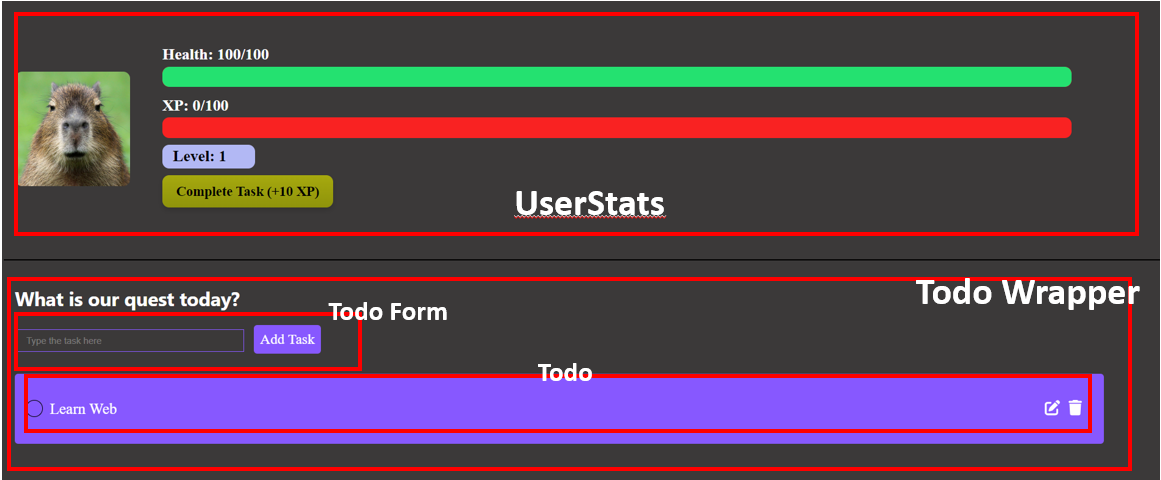
In the finished project is should have 4 different component
Setup The Project
1. Follow the previous lesson about how to create or start a react project or you can click here to navigate
2. Inside the src folder create 2 folder, component and styles
After that create new files inside each folder, below is the files you need to create
component folder
styles folder
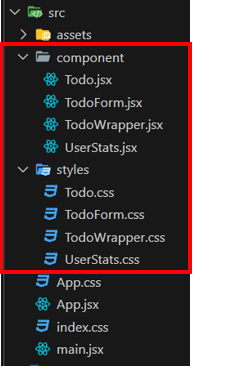
3. Change the code inside index.css with code below
:root {
  font-family: Inter, system-ui, Avenir, Helvetica, Arial, sans-serif;
  line-height: 1.5;
  font-weight: 400;
  background-color: #3B3939;
}
4. Change the code inside App.jsx with code below
import UserStats from "./component/UserStats";
import { TodoWrapper } from "./component/TodoWrapper";
import './App.css';

const App = () => {
  return (
    <div className="Home">
      <div className="Container">
          <UserStats />
          <TodoWrapper />
      </div>
    </div>
    );
}

export default App;
5. Change the code inside App.css with code below
.Container{
  align-items: center;
  background-color: #3B3939;
}

.profile-pic {
  width: 10%;
  height: 50%;
  margin-right: 2%;
  border-radius: 10px;
}

.stats {
display: flex;
align-items: center;
width: 100%;
margin-left: 1%;
}


.column {
display: flex;
flex-direction: column;
color: white;
font-size: 23px ;
width: 80%;
font-family: 'Sanchez', serif;
}

.stat {
margin-bottom: 10px;
position: relative;
margin-left: 1%;
color: #000;
font-weight: 700;
}

.bar {
height: 30px;
background-color: #F92222;
border-radius: 10px;
position: relative;
overflow: hidden;
display: flex;
align-items: center;
}

.health-bar {
height: 100%;
background-color: #24E170;
border-radius: 10px;
position: absolute;
top: 0;
left: 0;
display: flex;
align-items: center;
}

.xp-bar {
height: 100%;
background-color: #F4F90D;
border-radius: 10px;
position: absolute;
top: 0;
left: 0;
display: flex;
align-items: center;
}

.Info{
color: white;
}

.level-bar{
  background-color: #B2B8F4;
    padding-left: 15px;
    width: 120px;
    border-radius: 10px;
}